Element-wise Operations: LinqBegin4
Creating a Project Template and Getting Acquainted with the Task
The tasks in the LinqBegin group are designed to master various
methods of sequence transformation. All these methods are
extension methods of the System.Linq.Enumerable class and form
the LINQ To Objects interface (extension methods appeared in version 3.0
of the C# language).
The tasks cover most LINQ To Objects methods; they
are divided into 4 subgroups, each dedicated to specific
types of transformations: from the simplest (element-wise operations) to
the most complex (joining and grouping).
Let's consider one of the tasks related to element-wise
operations.
LinqBegin4°. A character C and a string sequence A are given. If A contains a single element ending with the character C, then output this element; if there are no required strings in A, output an empty string; if there are more than one required strings, output the string "Error". Note. Use a try block to catch a possible exception.
Performing a task using the Programming Taskbook
usually begins with creating a project template for the selected task.
The PT4Load software module, included in the taskbook, is designed to create the template.
This module can be launched using the
Load.lnk shortcut, which is automatically created in the student's working directory
(by default, the working directory is located on drive C and
is named PT4Work; using the PT4Setup program, also included in
the taskbook and available from Start Menu | Programs |
Programming Taskbook 4, any number of other
working directories can be defined; starting from version 4.15, new working
directories can also be defined directly from the PT4Load module by clicking the button
 ). ).
Starting from version 4.22, the PT4Load module can be launched using the auxiliary PT4Panel module,
designed for quick launching of other modules and various versions of the help system,
as well as for quickly switching between different working directories.
The task groups related to LINQ technology are not
included in the base set of the Programming Taskbook problem book.
For these groups to be available, it is necessary after installing
the Programming Taskbook to install its extension Programming
Taskbook for LINQ.
After launching the PT4Load module, its window will appear on the screen,
listing all available task groups:

If scroll buttons are displayed to the right of the group list, then the list
of groups can be scrolled using these buttons or the [Up] and [Down] keys.
The window title indicates the name of the current programming environment
and its version number. The provided figure corresponds to a configuration where
the current environment is Microsoft Visual Studio 2022
for the C# language.
When performing tasks dedicated to LINQ technology,
it is necessary to use the C#, Visual Basic .NET, or F# languages. If
an environment other than the required one is specified, you should call the context menu
of the PT4Load module (by right-clicking in its window) and select
the required environment from the list that appears.
The LinqBegin group should be present in the group list. Its absence
can be explained by two reasons: either the current language
is a language other than C#, Visual Basic .NET, or F#, or the Programming Taskbook for LINQ extension is not
installed on the computer.
After entering the task name (in our case LinqBegin4), the
"Load" button in the PT4Load window will become available and, by clicking it (or pressing the
[Enter] key), we will create a project template for the specified task, which
will be immediately loaded into the Visual Studio environment. We will
assume that the C# language is selected as the programming language.
The created project will consist of several files, however, to
solve the task, we will only need the file named LinqBegin4.cs.
This file will be loaded into the Visual Studio editor.
Let's present the contents of the LinqBegin4.cs file:
// File: "LinqBegin4"
using PT4;
using System;
using System.Collections.Generic;
using System.Linq;
using System.Text;

namespace PT4Tasks
{
    public class MyTask : PT
    {
        // When solving tasks of the LinqBegin group, the following
        // additional methods defined in the taskbook are available:
        // (*) GetEnumerableInt() - input of a numeric sequence;
        // (*) GetEnumerableString() - input of a string sequence;
        // (*) Put() (extension method) - output of a sequence;
        // (*) Show() and Show(cmt) (extension methods) - debug output
        //       of a sequence, cmt - string comment;
        // (*) Show(e => r) and Show(cmt, e => r) (extension methods) -
        //       debug output of r values, obtained from elements e
        //       of a sequence, cmt - string comment.

        public static void Solve()
        {
            Task("LinqBegin4");

        }
    }
}
The LinqBegin4.cs file begins with using directives, connecting
the main namespaces, including System.Collections.Generic for
generic collections, System.Linq for the Enumerable class,
containing LINQ to Objects extension methods, System.Text for
classes related to text processing, and PT4 for the PT class,
providing access to the core functions of the Programming
Taskbook. Then follows the description of the MyTask class - a descendant of the PT class.
The Solve method, where the task solution needs to be programmed,
contains a call to the Task method, initializing the task with the specified
name.
When performing tasks related to LINQ technology,
additional taskbook methods may be useful. A brief description
of these methods is provided in the comments located before
the description of the Solve method.
To run the created program, just press the [F5] key.
This will bring up the taskbook window. The window view shown in
the figure corresponds to the dynamic layout mode of sections,
which appeared in version 4.11 of the Programming Taskbook.
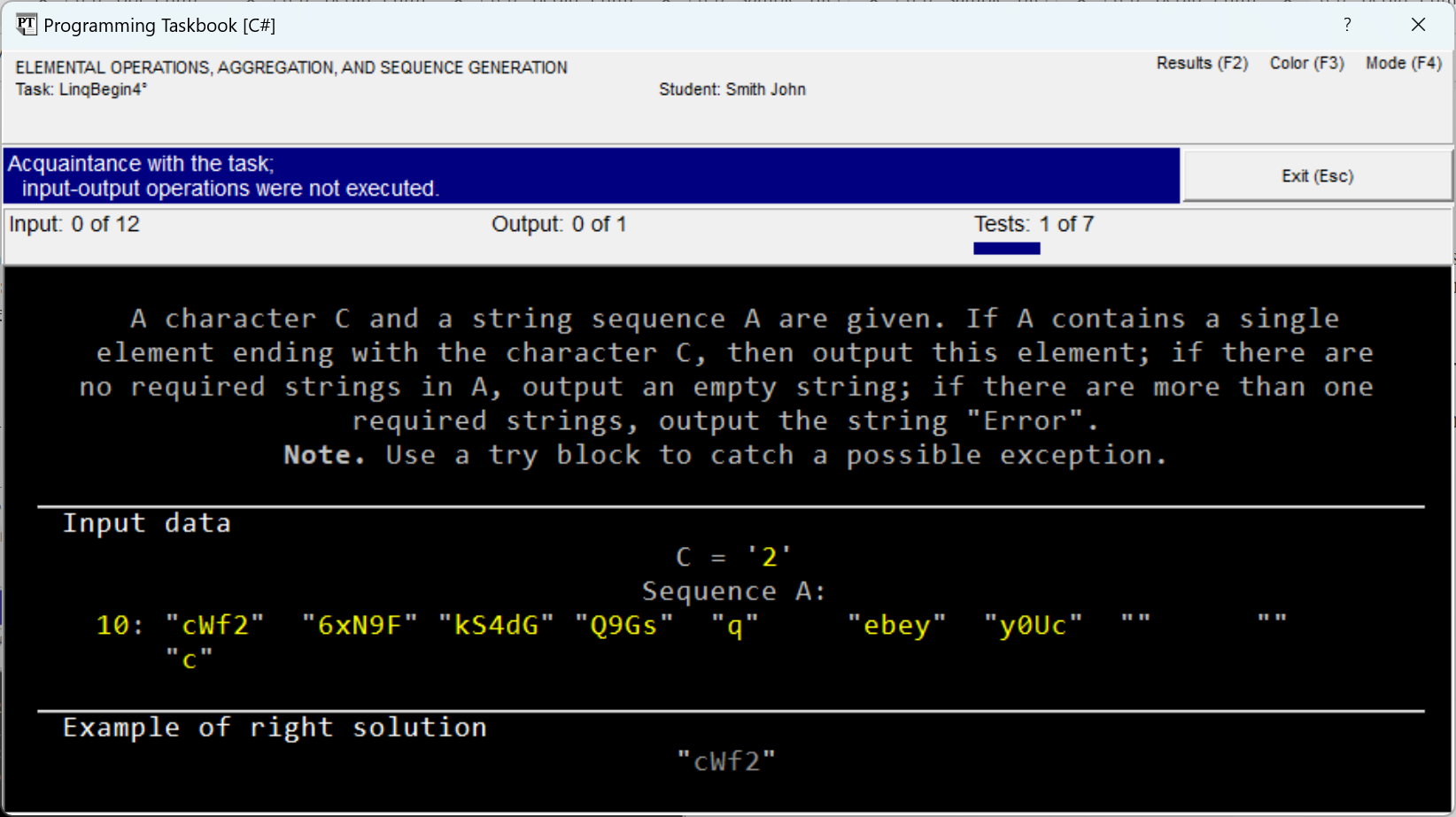
Since the program does not perform any data input and output
actions, the program run is considered introductory. During an
introductory run, the taskbook window displays three sections: the
task description, the initial data, and an example of the correct
solution.
All initial data are highlighted in a special color to distinguish them
from comments: if the window is set to the "on black background" color mode
(as in the figure above),
then the data is highlighted in yellow; in the "on white background" mode
the data is highlighted in blue. To switch the
color mode, just press the [F3] key
or click on the "Color (F3)" label in the upper right corner of the taskbook window.
Running the program allows you to familiarize yourself
with a sample of the initial data and the corresponding example of the correct solution for these initial
data. In our case, the set of initial
data includes a character C and a string sequence A. In all
tasks of the LinqBegin group, when defining a sequence, first
the number of its elements is specified, and then - the values of the
elements themselves (on the screen, the number of elements is separated from the list of values
by a colon), and the values may occupy several screen
lines. Character data is enclosed in single quotes, and
string data - in double quotes, which corresponds to the representation of character and
string constants adopted in the C# language. The use of quotes
allows, in particular, to "see" empty strings included in the sets
of initial or resulting data (as in the example of initial data
provided in the previous figure).
To exit the program, press the "Exit" button, the [Esc] key, or
the [F5] key, i.e., the same key that runs the program from the
Visual Studio environment (if using another environment, you can press the key
intended for running the program from that environment).
To get more acquainted with the task, you can use
two special modes of the taskbook: the demo mode and the mode for
displaying tasks in html format.
To run the program in demo mode, just
add the "?" symbol to the parameter of the Task method (in our case, the call
to the method will look like Task("LinqBegin4?");). The taskbook window in
demo mode has additional buttons that allow you to
go to the previous or next task, and also
display various sets of initial data and the associated
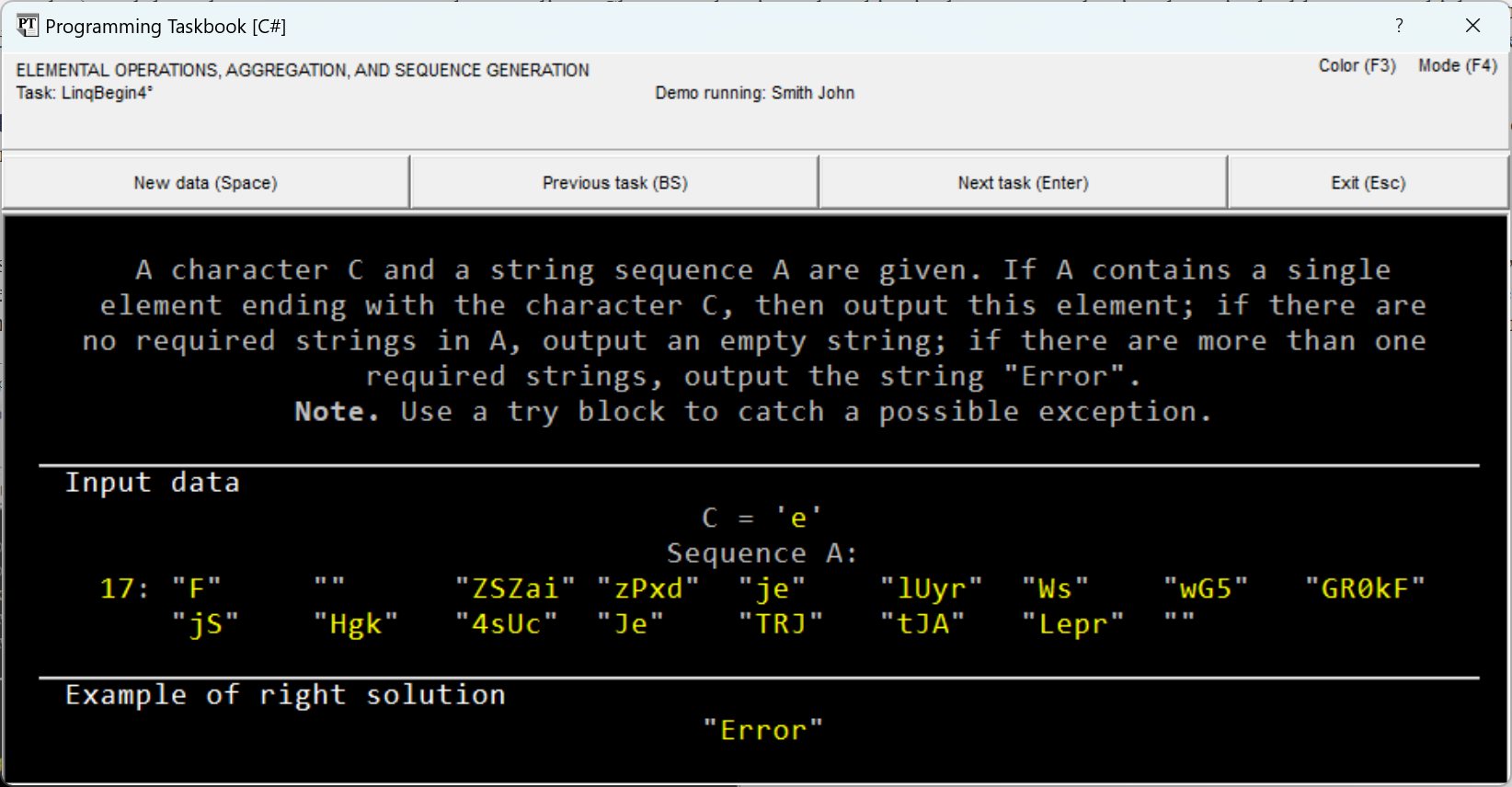
samples of the correct solution on the screen (see the figure). The figure shows a
situation where the initial sequence contains several
elements ending with the character C, equal to "e" (these are the elements
"je" and "Je"), so the correct solution requires outputting
the string "Error".
To display the task in html format, just click on the "Mode (F4)" label
in the taskbook window (or simply press the [F4] key). This will
launch the html browser used in the system by default, and it will
load an html page containing the task description and the text
of the preamble to the corresponding task group:
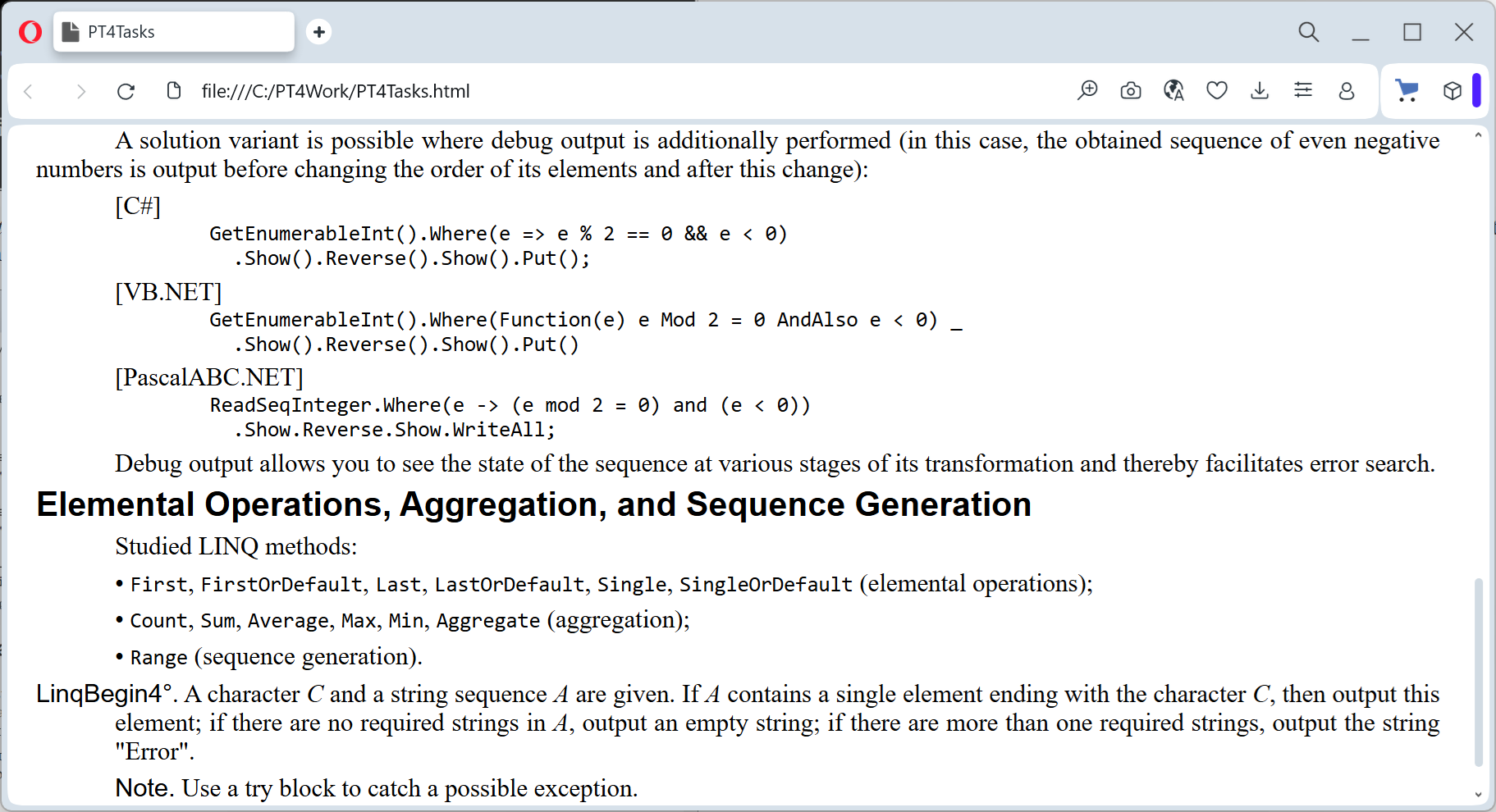
In this case, besides the description of the LinqBegin4 task,
the screen displays the preamble for the entire LinqBegin group and the preamble for the subgroup "Element-wise
Operations, Aggregation, and Sequence Generation", which
includes the LinqBegin4 task.
The task can be displayed in html format immediately after launching the program (without displaying the taskbook window),
if you add the "#" symbol to the parameter of the Task method (for example, Task("LinqBegin4#");).
The html page mode is convenient in several respects. First,
only in this mode can you familiarize yourself with the preambles to the task group
and its subgroups and thereby obtain additional
information that may be useful when performing the tasks.
Secondly, the browser window with the html page does not need to be closed
to continue working on the task; thus, using
this window, you can at any time familiarize yourself with the task
description, even if the current state of the program does not allow
compiling it and running it.
It is possible to display all tasks in html mode
belonging to a certain group. To do this, in the parameter of the Task method, you should
delete the task number, leaving only the group name and the "#" symbol
(for example, Task("LinqBegin#");).
Having finished this overview of the taskbook capabilities intended
for creating a project template and getting acquainted with the selected
task, let's move on to describing the solution process itself.
Performing the Task
The first stage in performing any task is inputting the
initial data. If the task is performed using an electronic
taskbook, then it is the taskbook that forms the set of initial data and
provides it to the student's program. Obviously, to obtain the
initial data prepared by the taskbook, the program must
use special input methods. These static methods
are defined in the PT class, which is an ancestor of the MyTask class. Therefore,
when calling input methods in the Solve function, you do not need to specify the name
of the class in which they are defined.
In accordance with the input organization approach adopted in the standard
.NET library, input uses functions without parameters,
each of which returns one element of the initial data of a specific type.
The Programming Taskbook provides functions
for inputting data of all basic types:
GetBool() - for inputting logical data (type bool);
-
GetInt() - for inputting integer data (type int);
-
GetDouble() - for inputting real data (type double);
-
GetChar() - for inputting character data (type char);
-
GetString() - for inputting string data (type string).
These functions are sufficient to organize the input of any
data included in the tasks of the LinqBegin, LinqObj, and LinqXml groups.
For example, to input data from the LinqBegin4 task, you can use
the following fragment (here and below we will only provide the description
of the Solve function, since the rest of the project does not require changes):
public static void Solve()
{
  Task("LinqBegin4");
  char c = GetChar();
  string[] a = new string[GetInt()];
  for (int i = 0; i < a.Length; i++)
    a[i] = GetString();
}
In this fragment, first the character c is described and input, then
the string array a is described and created (while reading the size
of the initial sequence, which is specified in the array
constructor), after which a loop is organized to input the values of the
array elements themselves.
When running the program, the taskbook window will look similar to
the one shown in the figure. This run is no longer considered introductory,
since the program performs data input-output actions.
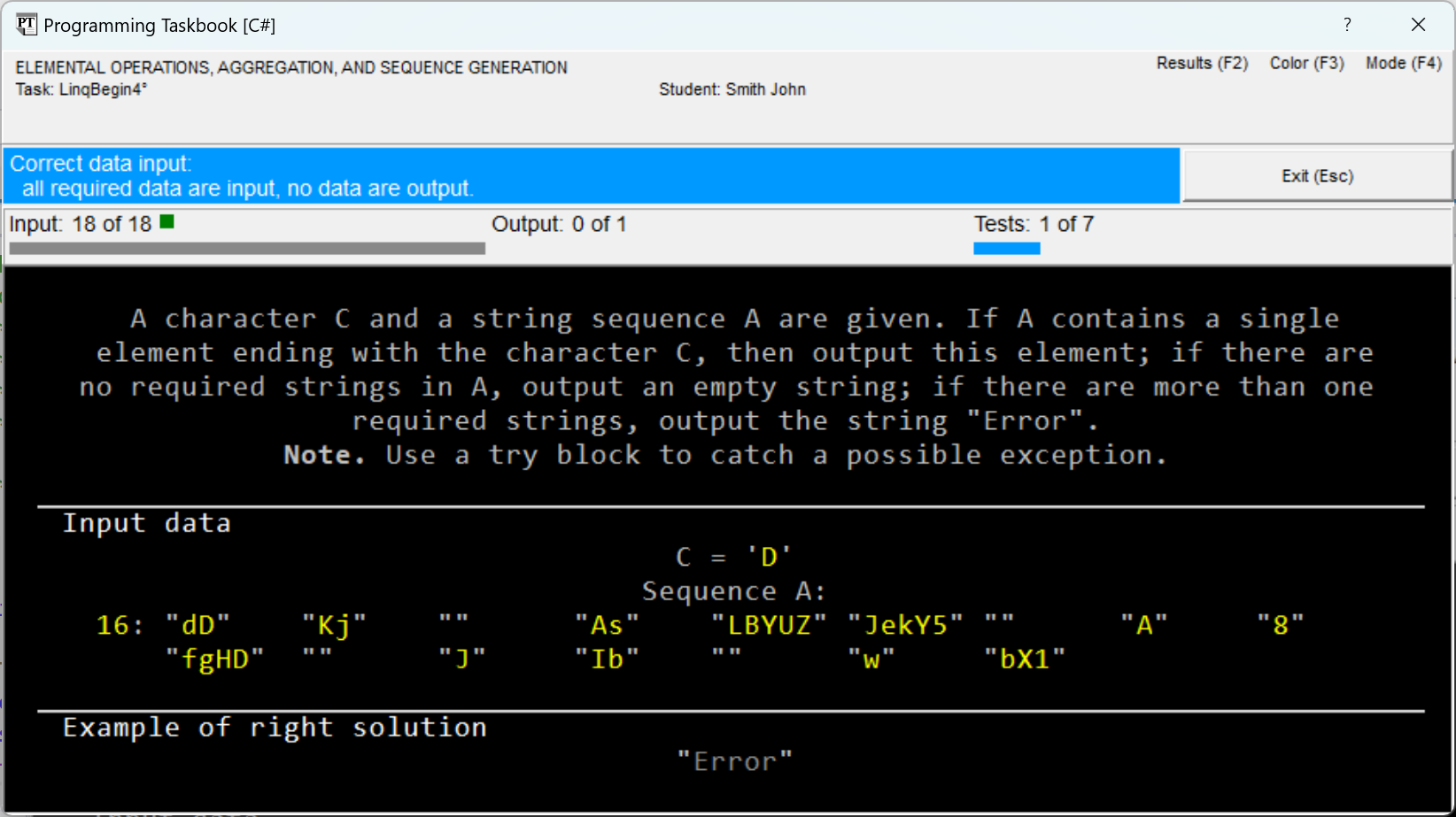
Note the additional
panel (indicators panel), which contains information about the number of
input and output data, as well as the number of successfully
passed test runs of the program.
In our case, the program has input all the initial data (as
evidenced by the first indicator and the text associated with it), but
the resulting data has not been output. We can say that we have successfully passed the first
stage of the solution, related to inputting the initial data.
Therefore, the information panel
contains the text "Correct data input",
and its background has changed to light blue.
Note that when various errors are detected,
the background of the information panel also changes, and in this case
various shades of red are used (for example, for errors related to
input or output of an insufficient number of initial or resulting
data, orange is used). Furthermore, the same color highlights the
title of the section related to the error (for example, when outputting an insufficient number of resulting data,
the title "Results obtained" is highlighted in orange).
In case of an erroneous solution, the
taskbook window displays not only the section with the obtained
results but also the section with an example of the correct solution.
All these additional
window elements are designed to simplify the search and correction of errors
detected by the taskbook during program execution.
Before proceeding to discuss the solution of the task, note one
additional feature available when performing tasks
of the LinqBegin group, namely the presence of auxiliary input functions
GetEnumerableInt() and GetEnumerableString(), described in the MyTask class
and providing quick input of integer and string
sequences. Thanks to these functions, the actions for
inputting initial data are simplified, and the obtained solutions become more
concise and clear.
Using the GetEnumerableString function, the solution fragment
responsible for inputting the initial data will consist of only two lines:
public static void Solve()
{
  Task("LinqBegin4");
  char c = GetChar();
  var a = GetEnumerableString();
}
In the provided program variant, a feature of the C# language is used,
which appeared simultaneously with LINQ technology and is closely related to it:
any variable can be described using the keyword
var, if this variable is immediately initialized with some
value. In such a situation, the variable type is automatically
determined by the type of the initializing expression (it is also said that
the variable type is inferred from the type of the initializing expression). In
our case, this capability allows for a more concise
notation - the word var instead of the type IEnumerable<string>, which is the
return value type of the GetEnumerableString function. Note that in
some cases (related to the use of so-called
anonymous types, which also appeared in the C# language simultaneously with
LINQ technology) it is impossible to do without the var keyword when describing variables.
When running the new solution variant, the same
message ("Correct data input") will be displayed.
Let's proceed to process the input data, based on
the application of LINQ technology. When choosing a suitable LINQ method,
it is useful to refer to the list of methods specified in the preamble to the
subgroup to which the task belongs,
since it is these methods that should be applied when solving tasks in
this subgroup. However, when performing tasks from subsequent
subgroups, it may be necessary to use not only the methods that
first appear in these subgroups but also any of the methods
considered in the preceding subgroups.
In our case, obviously, it is necessary to use one of the
methods related to selecting a single element: Single or
SingleOrDefault (element-wise operations also include the methods First
and FirstOrDefault, related to selecting the initial element
of a sequence, and Last and LastOrDefault, related to selecting its
final element). It should be noted that of all methods related to
element-wise operations, the methods Single and SingleOrDefault
are characterized by the most complex behavior (which is precisely why
we chose the LinqBegin4 task for analysis).
For any element-wise operation, a predicate parameter can be specified,
which allows selecting the elements for which
the corresponding operation should be performed. Such a parameter
must be formatted as a lambda expression, accepting an element
of the sequence and returning a logical value (true if
the element should be considered during the operation, false otherwise).
According to the LinqBegin4 task condition, it is required to analyze
the elements of the initial sequence ending with the character C. As
a predicate in this case, the following
lambda expression can be used (before the lambda expression symbol =>
its parameter is specified, and after it - the return value):
e => e.Length != 0 && e[e.Length - 1] == c
Note that without the first condition, the specified logical expression
would lead to an exception
IndexOutOfRangeException when processing empty strings (which may
be included in the initial sequence). To combine the two conditions,
it is necessary to use the && operation (logical AND with short-circuit
evaluation), in which, if the first operand is false,
the second operand is not analyzed (the & operation with full
evaluation cannot be used in this case, nor can the
order of these conditions be changed). Instead of comparing string lengths in
the first condition, you can compare the strings themselves (e != ""),
however, this comparison will be slower than comparing
lengths.
The specified variant of predicate implementation is not the only
possible one. If you use the EndsWith method of the string class, then
the predicate can be represented as a single condition:
e => e.EndsWith(c.ToString())
In this case, however, it is required to explicitly convert the
character c to the string type by calling the ToString method for it. Furthermore,
it should be considered that the EndsWith method requires comparing strings, which
is performed slower than comparing characters.
Let's choose one of the described predicates and use it in the
Single method, which returns the single element of the sequence
satisfying the specified predicate. The obtained element must be
passed to the taskbook to check the correctness of the solution; for this,
another static method of the PT class should be used - the Put method,
which can accept an arbitrary number of parameters of basic
types (logical, integer, real, character,
string). As a result, the next variant of the Solve function with the solution
of the task will take the form:
public static void Solve()
{
  Task("LinqBegin4");
  char c = GetChar();
  var a = GetEnumerableString();
  Put(a.Single(e => e.Length != 0 && e[e.Length - 1] == c));
}
The obtained program will correctly process
sequences containing a single element ending with the
character c, however, if the sequence does not contain such elements
or there is more than one, then an exception
InvalidOperationException will be thrown:
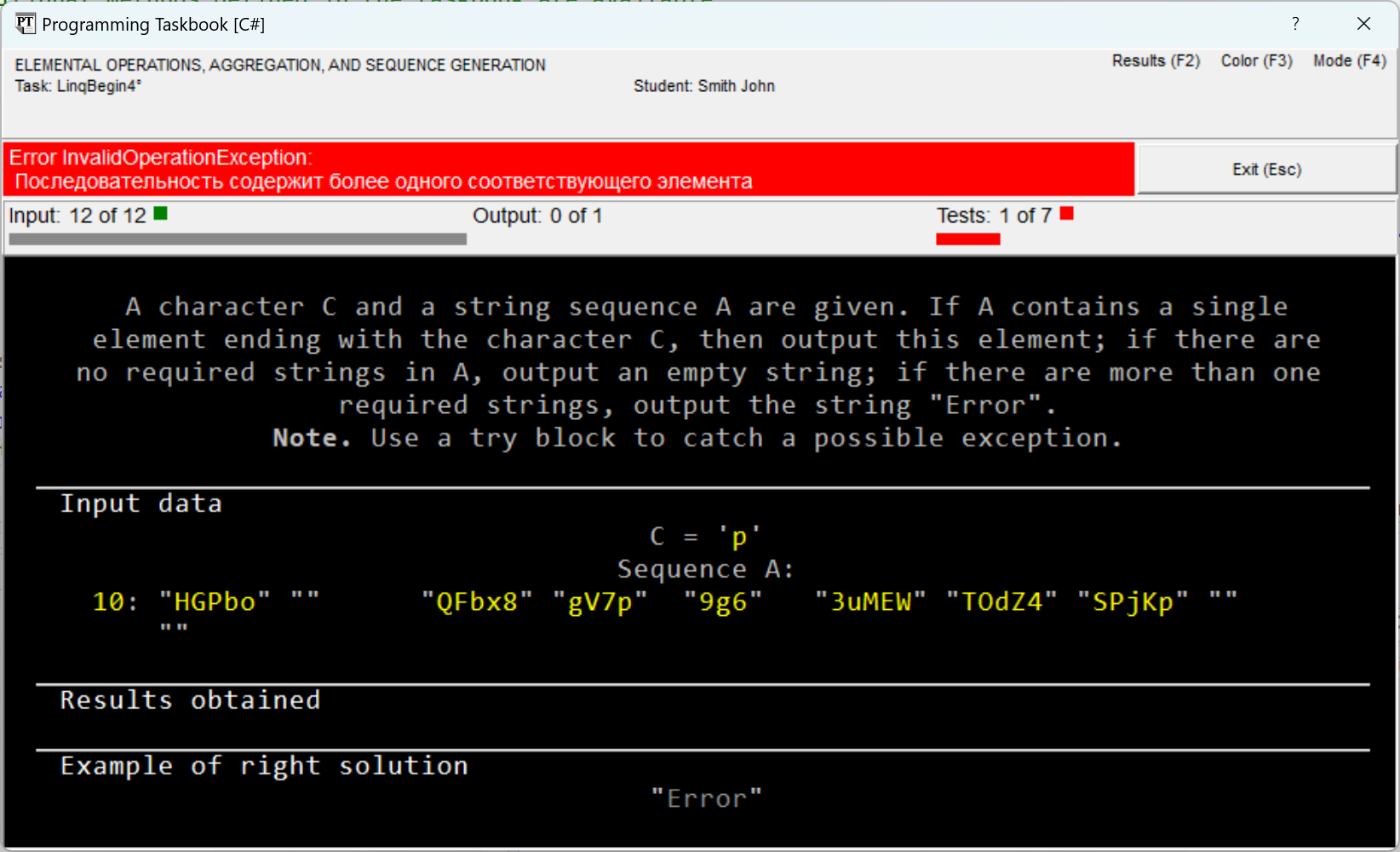
Two types of messages will be associated with the exception:
"Sequence contains more than one matching element" (as in the figure, in Russian) and
"Sequence contains no matching element".
To catch and handle exceptions, the
try–catch construct should be used. To access the exception object,
it must be described in the header of the catch block. Having this object, you can
access its Message field, containing a textual description of the
exception, determine the reason for throwing the exception by this field,
and output the required string (recall that according to the task condition, in case
of absence of suitable elements, an empty string should be output, and in case
of two or more suitable elements - the string "Error").
We get the first variant of the correct solution:
public static void Solve()
{
  Task("LinqBegin4");
  char c = GetChar();
  var a = GetEnumerableString();
  try
  {
    Put(a.Single(e => e.Length != 0 && e[e.Length - 1] == c));
  }
  catch (InvalidOperationException ex)
  {
    if (ex.Message.Contains("более"))
      Put("Error");
    else
      Put("");
  }
}
The solution can be simplified by using a variant of the
Single method - SingleOrDefault, which does not lead to throwing an
exception in case the sequence lacks
the required elements (note that other element-wise operations containing the text "OrDefault" behave similarly:
FirstOrDefault and LastOrDefault). In such a situation, the
SingleOrDefault method returns the default value (for numeric
sequences this is 0, for string sequences, as for
any sequences with reference data, - the value null).
Thus, when using the SingleOrDefault method,
an exception will be thrown only if the
initial sequence contains more than one required element.
In the second solution variant, the catch section became shorter, and the
try section increased:
public static void Solve()
{
  Task("LinqBegin4");
  char c = GetChar();
  var a = GetEnumerableString();
  try
  {
    string res = a.SingleOrDefault(e => e.Length != 0 &&
      e[e.Length - 1] == c);
    Put(res != null ? res : "");
  }
  catch
  {
    Put("Error");
  }
}
Instead of the ternary operation ?:, you can use the ?? operation
which appeared in C# version 2.0 and is often used in programs
applying LINQ technology. The expression a ?? b returns the value
a if it is not null, and the value b otherwise. Thus
the Put operator from the try section can be rewritten as
Put(res ?? "");
In such a situation, the need for the variable res disappears, and
the try section is reduced to a single statement:
public static void Solve()
{
  Task("LinqBegin4");
  char c = GetChar();
  var a = GetEnumerableString();
  try
  {
    Put(a.SingleOrDefault(e => e.Length != 0 &&
      e[e.Length - 1] == c) ?? "");
  }
  catch
  {
    Put("Error");
  }
}
Since the variable a is used in only one place in the
program, it is also unnecessary. This allows for an even more
shortened solution:
public static void Solve()
{
  Task("LinqBegin4");
  char c = GetChar();
  try
  {
    Put(GetEnumerableString().SingleOrDefault(e =>
      e.Length != 0 && e[e.Length - 1] == c) ?? "");
  }
  catch
  {
    Put("Error");
  }
}
It should be noted that when using LINQ technology, very
often the substantive part of the program is a chain
of sequential method calls; in our case, the chain consists
of only two calls (GetEnumerableString and SingleOrDefault), however,
it additionally includes the ?? operation. Also note that when
using the FirstOrDefault and LastOrDefault methods, there is no need for
explicit exception handling (although the ?? operation for them
may also be useful).
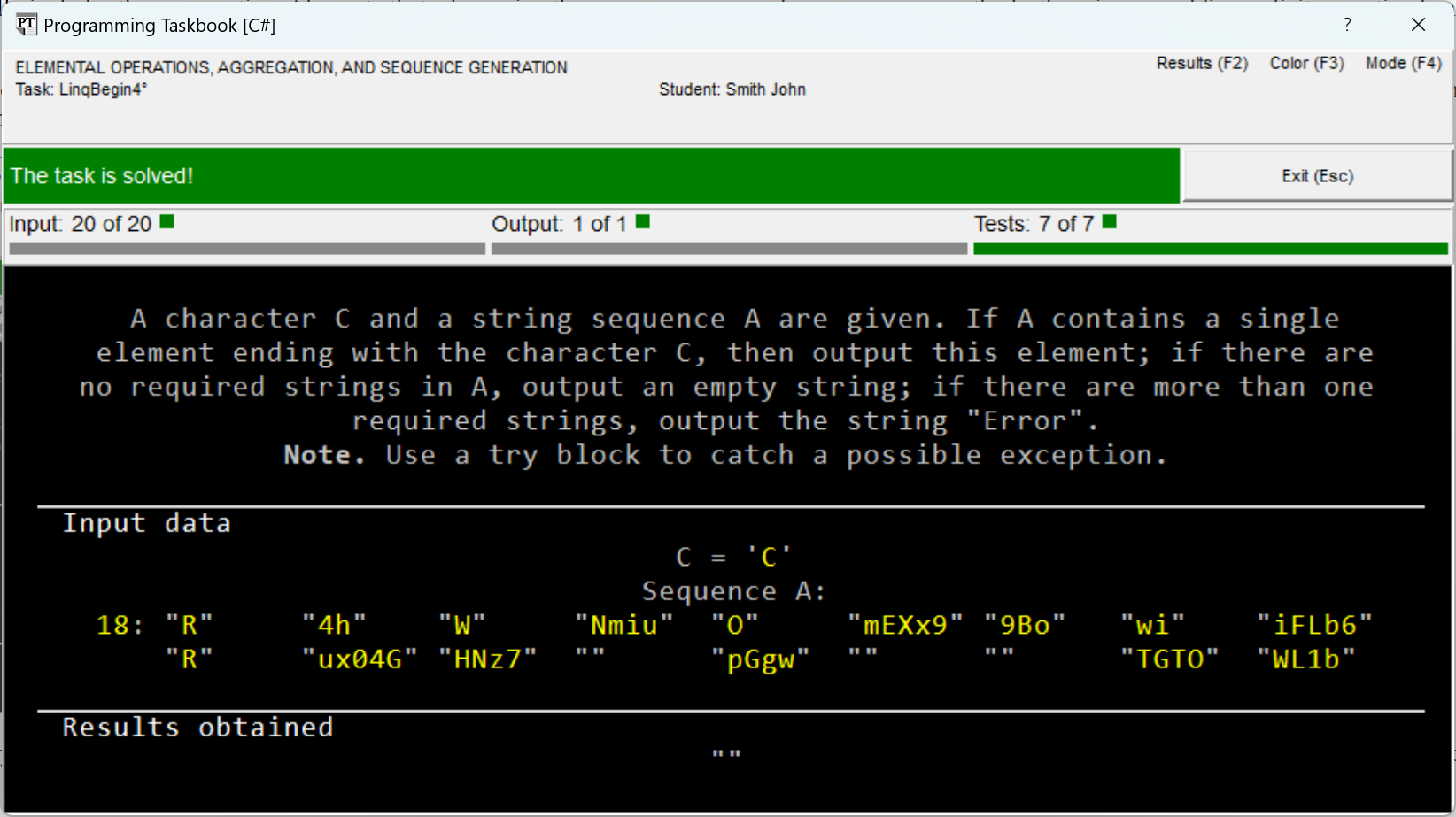
After passing seven successful test runs of the program, we will get
a message that the task is completed (see the figure). During a successful test
run, the window lacks the section with an example of the correct solution, because
this section would coincide with the section of obtained results.
By pressing the [F2] key, you can display a window with the protocol
of performing this task (this protocol is stored in encrypted form
in the results file results.dat). In our case, information about the
progress of the task may look as follows:
LinqBegin4  S16/04 11:43 Acquaintance with the task.
LinqBegin4  S16/04 11:55 Correct data input.
LinqBegin4  S16/04 12:03 Error InvalidOperationException.--3
LinqBegin4  S16/04 12:08 The task is solved!
The character specified before the information about the date and time of the test
run determines the programming language in which the
task was performed (the character S corresponds to the C# language (C Sharp); for the VB.NET
language, the character B is used, for the F# language - the character F). The numerical value specified at the end of the line
indicates the number of test runs performed consecutively and
completed with the same result.
|