|
Programming Taskbook |
|
|
||
|
Electronic problem book on programming |
||||
|
© M. E. Abramyan (Southern Federal University, Shenzhen MSU-BIT University), 1998–2026 |


|
|
Creating XML Documents: LinqXml10The tasks in the LinqXml group are dedicated to the LINQ to XML interface, designed for processing XML documents. The LINQ to XML interface includes, in addition to additional extension methods, a set of classes related to various XML components. This set forms the XML Document Object Model (XML DOM), which we will henceforth for brevity denote as X-DOM. The main classes included in X-DOM, as well as concepts used when working with XML documents, are briefly described in the preamble to the LinqXml group. Many classes included in X-DOM have properties that return various sequences; some methods of the classes (in particular, their constructors) can accept sequences as their parameters. In all situations related to processing sequences, it is possible to use basic LINQ queries, which are part of the LINQ to Objects interface and were studied by us when performing tasks from the LinqBegin and LinqObj groups. Familiarization with the capabilities of LINQ to XML naturally begins with creating XML documents. This topic is dedicated to the first subgroup of the LinqXml group. Let's consider the last of the tasks included in this subgroup. LinqXml10°. Given the names of an existing text file and an XML document to be created. Create an XML document with a root element root, first-level elements line, and processing instructions (processing instructions are child nodes of the root element). If a line of the text file starts with the text "data:", then it (without the text "data:") is added to the XML document as the data for the next processing instruction named instr; otherwise, the line is added as a child text node to the next line element. After creating the project template for this task using the PT4Load software module,
automatic launch of
the Visual Studio environment and loading the created project into it, the screen
will display the // File: "LinqXml10"
using PT4;
using System;
using System.Collections.Generic;
using System.Linq;
using System.Text;
using System.IO;
using System.Xml.Linq;
namespace PT4Tasks
{
public class MyTask : PT
{
// When solving tasks of the LinqXml group, the following
// additional methods defined in the taskbook are available:
// (*) Show() and Show(cmt) (extension methods) - debug output
// of a sequence, cmt - string comment;
// (*) Show(e => r) and Show(cmt, e => r) (extension methods) -
// debug output of r values, obtained from elements e
// of a sequence, cmt - string comment.
public static void Solve()
{
Task("LinqXml10");
}
}
}
Similar to the previously considered templates created for tasks in the
LinqBegin and LinqObj groups, this file contains a set of Note that the list of The created template lacks additional methods for
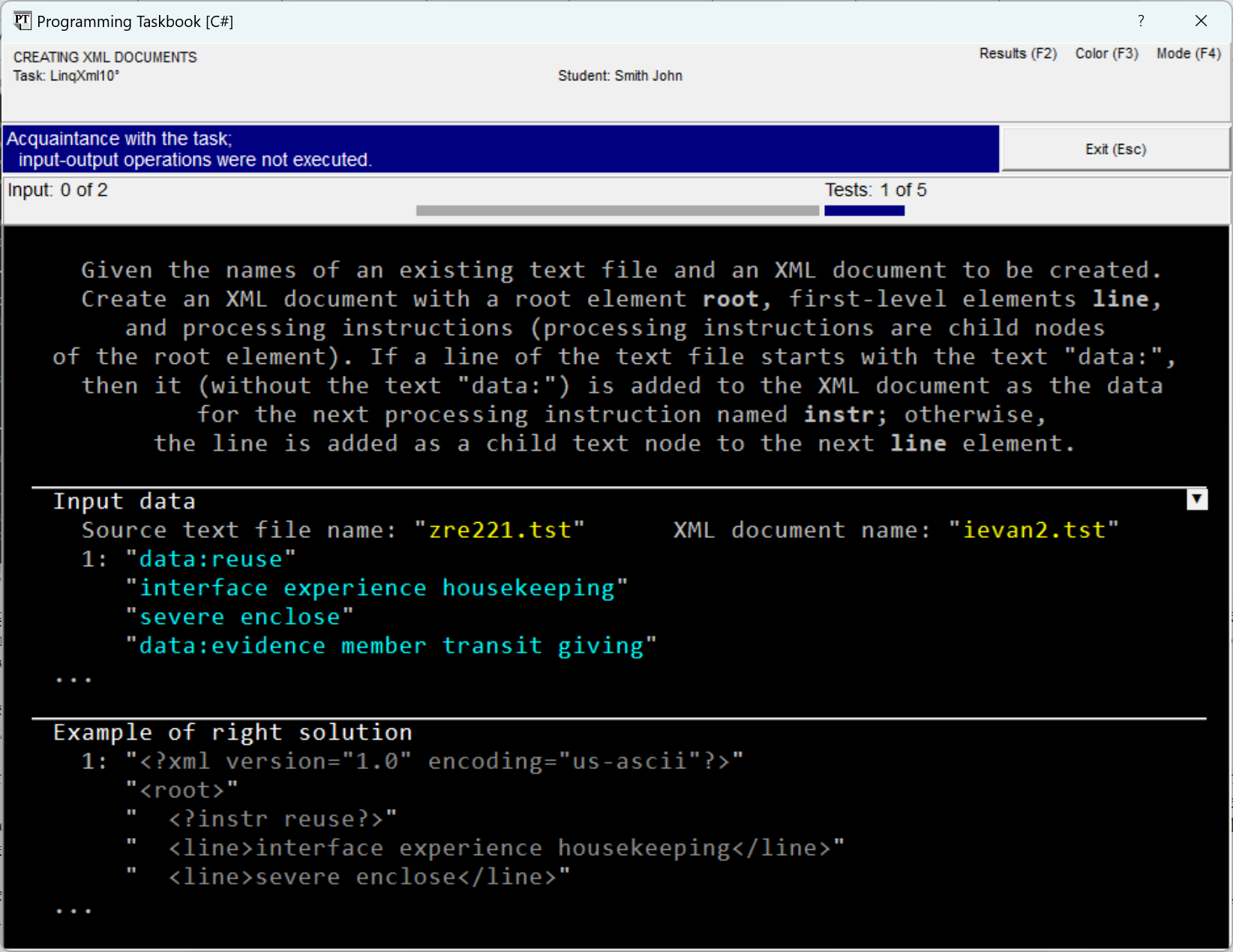
input-output of sequences (similar to the methods After running the created program template, we will see on the screen the taskbook window containing the task description, as well as an example of initial data and correct results:
Although the file data in the provided figure is displayed in an
abbreviated form, the indicated fragments demonstrate all the features of
this data. The source text file contains lines
that are sets of words, and some lines
start with the text "data:" (in the figure, the first
line as well as the fourth line contains this text); the resulting file contains an XML document in the
"us-ascii" encoding, including the root element An element of an XML document necessarily has a name; it can be
represented as paired tags of the form A processing instruction is a special component of an XML document,
which is enclosed in brackets of the form Data for the As already noted, the initial string sequence
is easiest to obtain using the var a = File.ReadLines(GetString()); To create both the XML document itself and its components,
constructors of the corresponding classes should be used. When
performing this task, we will need the following classes,
included in X-DOM: An important feature of the constructors of the As an example of functional construction of an XML document,
here is a fragment that, based on a sequence of strings XDocument d = new XDocument(
new XDeclaration(null, "us-ascii", null),
new XElement("root",
a.Select(e => new XElement("line", e))));
In this fragment, first the constructor of the
Remark. When defining content in the constructor of the
The provided fragment does not specially process lines of the initial sequence that start with the text "data:" (which should be converted not into elements, but into processing instructions). This shortcoming we will correct later. It remains to save the obtained XML document under the required
name. For this, it is sufficient to use the d.Save(GetString()); When calling this method, it is not required to additionally specify the
encoding used, since it was previously specified in the declaration of the
XML document. Also note that the
Remark. When performing tasks, the possibility of automatic
formatting of the XML document turns out to be very useful, as
it simplifies the analysis of the obtained XML document and its comparison with the
"correct" sample. In a situation where the program generates an
XML document not intended for direct
viewing by a person, the possibility of
formatting can be disabled by specifying in the It is possible to obtain a textual representation of an XML document without
saving it to a file; for this, it is sufficient to call for an object of type
The Combining the above operators, we get the first (still not entirely correct) variant of the solution: public static void Solve()
{
Task("LinqXml10");
var a = File.ReadLines(GetString());
XDocument d = new XDocument(
  new XDeclaration(null, "us-ascii", null),
  new XElement("root",
    a.Select(e => new XElement("line", e))));
d.Save(GetString());
}
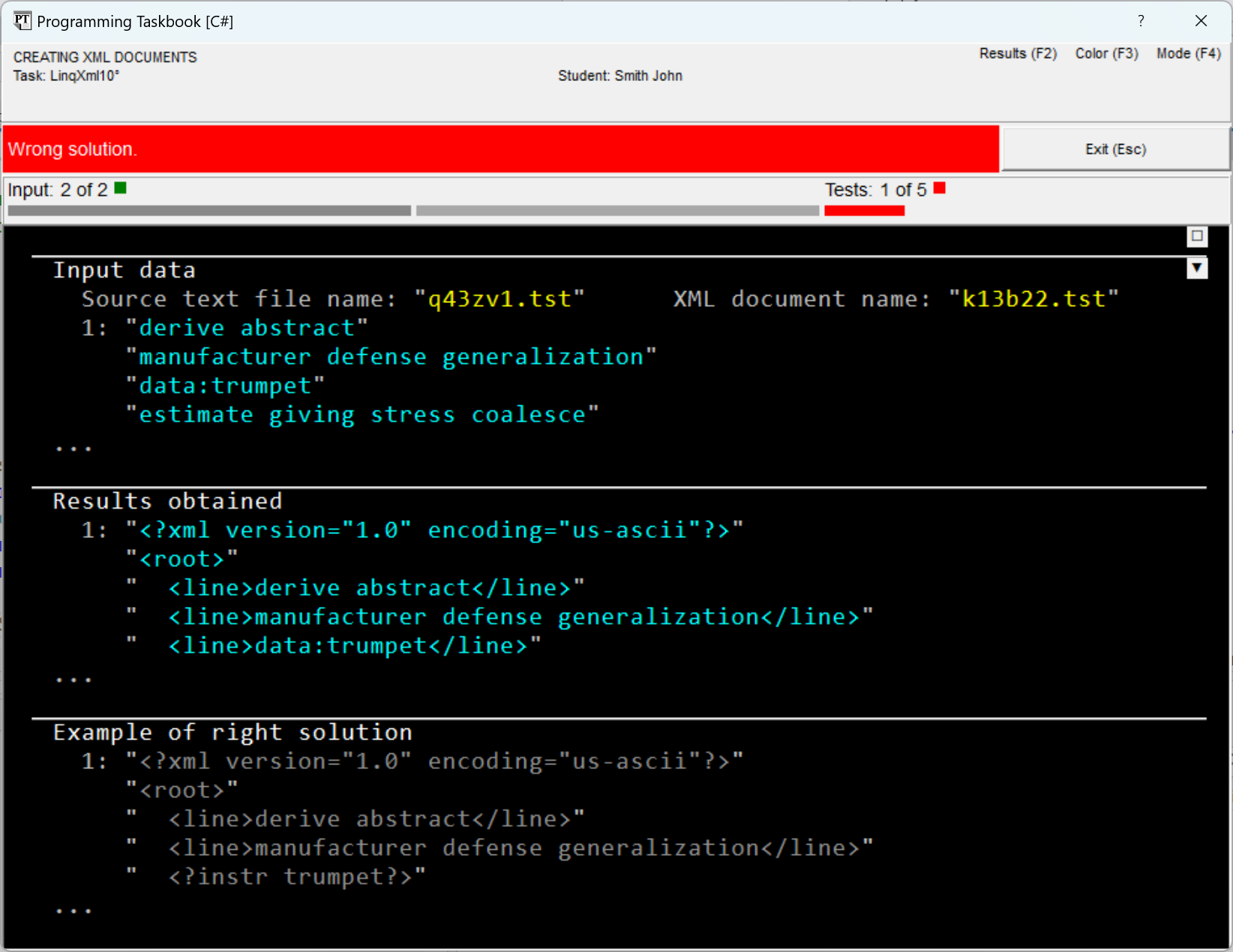
When running the program, a message about an erroneous solution will be displayed in the window (to reduce the window size, the section with the task description is hidden in it):
To obtain an XML document that meets the conditions of the task,
when creating the document e => e.StartsWith("data:") ?
new XProcessingInstruction("instr", e.Substring(5)) :
new XElement("line", e)
When creating a processing instruction, as its data,
a substring of the string However, when trying to compile the obtained program, a
compilation error message will be displayed. The error is that
by the provided lambda expression, the type of
elements of the returned sequence cannot be determined (some elements will
have the type e => e.StartsWith("data:") ?
new XProcessingInstruction("instr", e.Substring(5)) :
new XElement("line", e) as XNode
Remark. The Instead of the Emphasize that the type cast does not change the
actual type of the sequence elements, it only ensures a
uniform interpretation of all these elements as XML nodes, thereby giving the
compiler the opportunity to determine the type of the obtained
sequence (in our case Let's present the final variant of the solution: public static void Solve()
{
Task("LinqXml10");
var a = File.ReadLines(GetString());
XDocument d = new XDocument(
new XDeclaration(null, "us-ascii", null),
new XElement("root",
a.Select(e => e.StartsWith("data:") ?
new XProcessingInstruction("instr", e.Substring(5)) :
new XElement("line", e) as XNode)));
d.Save(GetString());
}
After five test runs of the program, we will get a message that the task is completed.
|

|
|
Designed by M. E. Abramyan
and V. N. Braguilevsky |
Last revised: |